


AR Drawing - Trace Art Studio
0.00.00 Reviews
App Specs
- Version
- 1.0.1
- Updated On
- License
- Free
- Downloads
- 10,000+
- Developer
- Sondark
- Categories
- Art & Design
- Platform
- Android
Screenshots
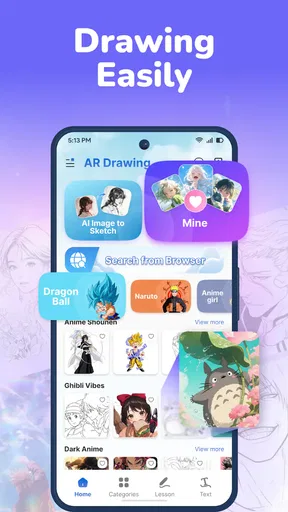


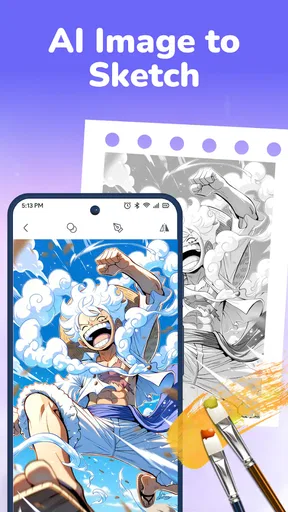
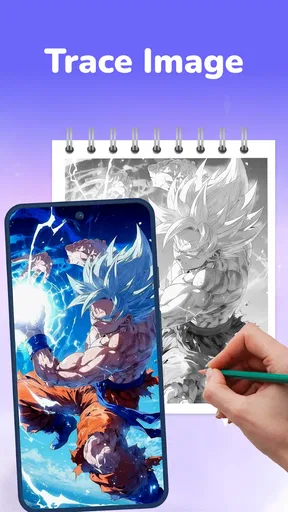
 Analysis by AppCompare
I find AR tracing most useful when I treat it as a guide rather than a shortcut: it can help me get a first outline onto paper, but the decisions about shape, pressure, and detail are still mine. AR Drawing - Trace Art Studio is aimed at that practical middle ground between looking at a reference and drawing entirely from memory. Its approach may make a blank page feel less intimidating, especially when I want to practise without setting up a full digital workspace.
A camera-led way into drawing
The idea is simple to understand: use a phone camera to position an image over a real surface, then follow the visible guide as you draw. I can see the appeal for a beginner who knows what they want to sketch but struggles to judge proportions. It gives the hand a starting route while leaving room to change the result. That distinction matters: tracing can help build confidence, but copying an outline alone will not teach every part of drawing.
For a useful practice session, I would choose one uncomplicated reference, make a light first pass, and then put the guide aside to add details from observation. That turns the exercise into more than line-following. Comparing the traced outline with my own additions also gives me a practical way to notice where I tend to make shapes too wide, too narrow, or uneven.
Readable instructions and a focused workflow
The published review describes a straightforward introduction and an interface intended to get a new user started without much fuss. For a camera-based drawing tool, clarity is especially important: I need to understand what I am looking at, where the reference sits, and how to keep my paper in a comfortable position. A simple entry point can be more valuable here than a screen crowded with controls.
I would still approach a tracing session as a small setup task rather than expecting to draw instantly. A stable phone position, a sheet that does not slide around, and enough room to move my drawing hand can make the difference between a useful guide and a distracting one. Before committing to a detailed picture, I would test the setup with a few simple lines. It is an easy way to see whether the camera view and the page stay aligned while I work.
Different hands, eyes, and learning styles
Tracing can suit people who learn by watching a line and repeating it, including newcomers who feel stuck when asked to invent a subject from scratch. It can also provide a lower-pressure activity for someone drawing with a child or helping a friend practise basic shapes. I would keep the goal modest: one outline, a few features, and a chance to enjoy the process rather than aiming for a polished result.
There are trade-offs for motor and sensory comfort. Holding a phone steady while drawing calls for coordination, and a person who finds sustained hand movement difficult may prefer to work in short stages or ask someone else to position the device. Camera-based alignment can also be visually busy, particularly when the reference and the real page compete for attention. Taking a pause between stages and simplifying the chosen image can help keep the task manageable, though the app itself cannot remove those physical or visual demands.
Worth Reading Before You Choose

Flipboard Shows What News Apps Must Do Beyond the Feed

Switching to Android Auto Means Rethinking Your Driving Routine

Google Calendar Makes a Crowded Week Easier to Manage

Ludo King Makes the Most of the Minutes Between Plans

Baby Panda World Brings Quick Play to Modern Phones, but Its Game Library Feels Busy

ESPN’s Live Game View Makes Following Close Games Easier
Choosing the right place and materials
This kind of activity makes most sense where I can settle the phone and paper at a workable angle. At a kitchen table, for example, I could choose a simple image, secure the page with a couple of ordinary objects, and spend a short break tracing its broad shapes. I would avoid trying to draw while walking, balancing the phone in one hand, or working in a crowded spot where the page and camera are easy to bump.
Light is a real consideration for camera-based tracing. The earlier review notes that the AR view can be less dependable in dim conditions, so I would use a well-lit table and check visibility before starting a complicated sketch. A plain, uncluttered surface can also make it easier to focus on the page. If the overlay feels awkward, changing the position of the phone or paper is a more useful first adjustment than pressing ahead and hoping the alignment improves by itself.
Getting Started with Ease
Diving into AR Drawing - Trace Art Studio is as easy as pie. As soon as you open the app, you're greeted with a user-friendly interface that guides you through the basics. The onboarding process is straightforward, ensuring you can get your creative juices flowing without any hiccups.
One of the coolest features is the augmented reality element. By using your phone’s camera, the app allows you to overlay images onto real-world surfaces. This means you can trace over them directly, making it perfect for learning proportions and improving your sketching skills. Who knew technology could make drawing so approachable?
Features That Spark Creativity
The app isn’t just about tracing; it’s packed with features that help you create like a pro. Whether you want to sketch a portrait or design intricate patterns, the app has got you covered. Here’s a quick rundown of some features that stood out to me:
- Wide Range of Templates: From animals to architecture, there’s a template for every kind of art you might want to try. This is perfect for those days when inspiration is running a little low.
- Customizable Brushes: The app offers a variety of brush styles and sizes, letting you experiment with different textures and effects. It’s like having a complete art kit in your pocket.
- Layering System: Just like professional editing software, you can work in layers. This makes it easier to manage complicated drawings and add depth to your work.
Using the tools with intention
Those options point toward two different kinds of work: the camera-guided task of transferring a reference to paper, and the more open-ended process of refining an image with digital drawing tools. I would not assume that every listed tool is needed for every session. If my aim is to practise a clean silhouette, extra brush choices could distract from the exercise; if I am exploring a more involved composition, layers may make it easier to keep separate parts of the work organised.
A helpful habit is to decide what I want to practise before opening a template. For example, I might focus on the angle of a roofline, the spacing between facial features, or the contour of a leaf. A single target keeps the session measurable without turning it into a test. It also helps me judge whether tracing is genuinely improving my observation or merely producing a neat outline.
Why You'll Love It
Now, I know what you’re thinking: “Is it really that good?” Well, let me tell you, using this app feels like having a personal art instructor with you 24/7. The ability to trace over real-world objects and images is a game-changer. It removes the intimidation factor often associated with drawing, making art accessible to everyone, regardless of skill level.
Plus, the app keeps things fresh with regular updates, introducing new templates and features that keep you coming back for more. It’s like a never-ending art class you can attend anytime, anywhere.
How it compares with other ways to practise
Compared with drawing from a reference on a separate screen, camera-guided tracing offers a more direct bridge between the image and the page. That can be helpful when proportion is the main obstacle. The trade-off is that a conventional reference lets me look back and forth freely, without needing to keep a camera view positioned over my work area. For learning to draw from observation, that slower method may build more independent judgement.
Compared with a standard digital sketching app, the appeal here is the physical-paper workflow: I can practise with a pencil and see the marks appear on the sheet in front of me. A digital canvas is usually a better fit when I want to undo freely, experiment with colour, or work without arranging a phone above a surface. I would choose this app when I specifically want camera-assisted tracing, not as a universal replacement for drawing apps, a class, or a traditional sketchbook.
Room for Improvement
No app is perfect, and AR Drawing - Trace Art Studio is no exception. While it excels in many areas, there are a few quirks that could be polished. For instance, the AR feature can be a bit finicky in low-light conditions. So, make sure you're in a well-lit area to get the best results.
Another point to consider is the device compatibility. The app is quite resource-intensive, so it might not run as smoothly on older devices. But if you’ve got a relatively recent smartphone, you’re good to go.
Who is likely to get the most from it?
I would recommend trying it if you are new to drawing, enjoy learning by copying visible forms, or want a low-pressure activity to do at home. It may also suit someone who already sketches and wants a quick way to block out a reference before adding personal changes. The app is free to download, is rated for Everyone, and is developed by Sondark. It is an art-and-design app with 10K+ installs, an average rating of 0.0, and a current version of 1.0.1; it was released on Apr 9, 2026. It requires Android 6.0 or later, and in-app purchases are listed at $9.99 per item.
The rating figure is not a useful way to predict whether the tracing workflow will fit me, so I would judge it by the task I actually want to do. I would skip it if I mainly need a full-featured digital illustration workspace, prefer drawing without a camera setup, or find holding a phone steady uncomfortable. If I need structured instruction in perspective, anatomy, or shading, a tracing aid can support practice but cannot replace lessons that explain why forms look the way they do.
Questions worth considering before a session
One practical question is whether I need special drawing materials. The workflow described is based on tracing over a real surface, so I would start with ordinary paper and a pencil rather than buying supplies first. A simple subject is also a better first test than a highly detailed image: it lets me concentrate on positioning and line control before deciding whether the app fits my routine.
Another question is whether the tool is suitable for a child or a shared family activity. Its Everyone content rating makes the content broadly suitable, but the phone still needs careful placement, and a younger user may benefit from an adult helping set up the page and camera. For a group activity, I would take turns with one reference at a time instead of crowding around the device; each person can interpret the same outline differently once the guide is no longer the focus.
Finally, I would think about what success means before starting. A finished drawing is one possible outcome, but a short exercise that helps me notice proportions can be worthwhile even if the result is rough. Keeping the first attempt small makes it easier to tell whether the camera-assisted method is useful for me without investing a long session in an awkward setup.
Final Thoughts
All in all, AR Drawing - Trace Art Studio is a fantastic tool for anyone looking to hone their drawing skills or simply have a bit of creative fun. Its user-friendly interface and innovative features make it stand out in the crowded world of art apps.
Whether you’re a total newbie or a seasoned sketcher, this app has something to offer. It breaks down the barriers to entry in the art world and invites everyone to pick up a virtual pencil and start drawing. So, why wait? Dive in and let your creativity take the wheel!
My inclusive verdict
My recommendation is a qualified one: the camera-led approach can make a first drawing feel more approachable, and the templates, brushes, and layers described in the review offer room to explore beyond a basic outline. At the same time, its usefulness depends on being able to see the guide clearly and keep the phone and page in a workable position. That makes lighting, a stable surface, and a simple first image more than minor details; they shape whether the experience feels inviting or frustrating.
I would try it for focused, informal practice, especially when I want help getting proportions onto paper. I would choose a regular sketchbook reference or a digital drawing tool instead when I need more freedom, less setup, or a different kind of instruction. For people whose hands, vision, or surroundings make camera alignment difficult, the app may not be the easiest route, and adapting the session—or choosing another method—is a sensible choice. Its best role is as a practical drawing aid, not a measure of artistic ability.
Pros
- Easy to use interface for beginners
- Wide range of templates available
- Supports multiple drawing tools
- Allows layering for complex designs
- Real-time AR tracing feature
Cons
- Requires a stable internet connection
- Limited free features without subscription
- Occasional lag in AR mode
- Ads can be intrusive at times
- High battery consumption
FAQs for AR Drawing - Trace Art Studio
What is AR Drawing - Trace Art Studio and how does it work?
AR Drawing - Trace Art Studio is an innovative app that uses Augmented Reality (AR) technology to help users trace images onto paper. By projecting the chosen image onto your drawing surface via your device's camera, it guides you to create accurate sketches and drawings, perfect for both beginners and experienced artists.
Is AR Drawing - Trace Art Studio suitable for beginners?
Yes, AR Drawing - Trace Art Studio is designed to be user-friendly for beginners. It provides step-by-step guidance, allowing users to start with simple shapes and gradually progress to more complex designs. The AR technology helps maintain accurate proportions, making it a great tool for learning and practicing drawing skills.
What devices are compatible with AR Drawing - Trace Art Studio?
AR Drawing - Trace Art Studio is available for both Android and iOS devices. However, it requires a device with AR capabilities, such as ARKit for iOS or ARCore for Android. Make sure to check if your device supports these features to fully utilize the app's capabilities.
Does AR Drawing - Trace Art Studio offer any in-app purchases?
Yes, AR Drawing - Trace Art Studio offers in-app purchases. While the app is free to download, certain features, templates, and advanced tools may require payment. These purchases can enhance your drawing experience, offering more options and customization to improve your artwork.
Can I use my own images in AR Drawing - Trace Art Studio?
Absolutely! AR Drawing - Trace Art Studio allows users to import their own images for tracing. This feature provides great flexibility and personalization, enabling you to create art from photos or designs you are passionate about. Simply upload your image, adjust it on the screen, and start tracing with ease.


